You can search extensively for your dream job or create it yourself. I learned this from the book “From Paycheck to Purpose.”
I am on a mission to create a job that perfectly suits how I envision my future. I became a writer to live the laptop life of freedom with no strings attached.
Welcome back to the Publishing Chronicles series (Part 1, Part 2, Part 3, Part 4), where we discuss the joys of being a writer.
What is Passive Income?
Travel anywhere while making money. I chose writing over other artistic endeavors like podcasting, YouTubing, or making music because of freedom of movement.
I can go anywhere and make money with a laptop and an internet connection. I recently tested my theory by traveling to Tokyo, Japan, for a couple of days. Sure enough, I was writing and publishing with the best of them.
Keep a lightweight workflow. To keep your workflow light, you must prevent “workflow inflation.” I have kept my workflow so simple that I can do it with a Chrome browser on any computer (within reason).
As you continue to improve your abilities, you will want to add desktop software, laptop accessories, or other complex additions. I avoid these at all costs.
Create a Never-Ending Stream of Content 2
I am using the same software I used in the beginning. I understand that my final destination is to retire overseas on passive income. I want to go to a cafe and accomplish my entire workflow without bringing a large-sized tote bag.
My workflow and computer software. I have used the same workflow for almost two years now. Of course, I have simplified and sped up the process through sheer repetition. Let’s review my software and hardware.
My hardware. I wrote an article about my favorite laptop of all time, The Samsung Galaxy Chromebook—then it crapped out on me.
I needed a laptop with a long-lasting battery, so I decided to buy the fully-maxed out M1 Macbook Air (affiliate links). Yes, it costs a lot of money ($1,600), but the 16 gigs of RAM help navigate a large folder of Google Docs.
Living Overseas Passively on Retirement Income
That same month, I also bought an M1 Mac Mini ($600) to use on a massive tv screen. I use this to have two Chrome browsers open side-by-side. I can achieve this on my laptop, but why not use a 46-inch monitor if you have one?
Finally, I bought an M1 24-inch iMac ($1,200). They only had the least expensive variant, which is okay by me. I use this computer solely to consume YouTube while editing and grinding out administrative tasks.
All in all, I have three Mac computers, but I can do everything from one single laptop. I love my Macbook Air because of the battery life and typing experience. When traveling, I use my Galaxy Tab 4 to consume YouTube. I will upgrade to the Galaxy Tab S8 Ultra as soon as I get stateside.
Preferred Shares vs. Closed-End Funds
Software- Writing. I use Google Docs to do all of my writing. This platform is perfect for taking all of my articles and artwork to any available computer.
On Mac OS hardware, Google Docs has a software download that helps it integrate with the Finder. This program allows you to use Google Drive as a regular folder while uploading your content seamlessly in the background.
If you move too fast, you can run into issues uploading your documents and artwork to platforms like Amazon. However, this doesn’t happen often enough to be a big deal.
I have the 5TB Google Drive option for $25/month, and I am nowhere near full. Uploading videos is the fastest way to reach your storage limits, so avoid this if possible.
Passive Income in DeFi 104: Yield Farming
Software- Editing. After writing my rough draft, it is time to edit. I edit with the built-in Google Docs editor; then, I use Grammarly to see what it recommends. Most times, I accept its recommendations; however, we do go back and forth from time to time.
Software- Pinterest. After editing, it’s time to insert all of my links to past articles. I can do this easily by pulling the links directly from Pinterest. I upload all of my cover art and articles to Pinterest for this reason.
Software- Stock photos. If you are a writer, you’ll need access to stock photos. You could theoretically create your own if you’d like, but it’s much easier to pay for them.
I tried Adobe stock photos, but it was too expensive for the number of images I use. I decided on Pixlr.com because it has unlimited photo downloads for $150/year. I download at least ten photos a day, so it is an excellent price.
Should You Manage Your Own Rental Properties?
Software- Photo editing. Once I have the photos and graphics I think I want; it’s time to create a book cover and article artwork. I first start with the book cover and make the article artwork from the same design language.
Luckily for photo editing, I can use Pixlr.com for all my needs. It is an entirely web-based solution. You may have the temptation to install a desktop client like Adobe photoshop, but I would avoid adding this solution.
Photoshop costs a lot of money, and we are writers, not graphic designers or advanced photographers. Your book covers only need to be “suitable.” If you have to spend hours designing book covers, your entire workflow could triple in length.
As it stands, I can create a book “from writing to publishing a paperback” in roughly 4-5 hours. I break this up into different tasks throughout the day.
Retirement Planning for the Average Person 1+2
Software- Book Blurb. Every book needs a description or “blurb.” I usually try to write this at the end of the night. When I wake up, I can start grinding mindlessly in the morning. I use Google Docs to write my descriptions.
I keep my descriptions short. I have short books, so I keep my description to 4-5 sentences—no need to overdo it with hype. Plus, there is no need to oversell your book. If you do, it can lead to disappointment from your readers.
Software- Building a book. It’s time to build my book. I review my article and extract ten pertinent articles that I should include in my book. I have 900 pieces, so I have a massive back catalog to fill out my books.
I put two Chrome browsers side-by-side to create my books quickly. This is the mindless grinding of grabbing articles and artwork from various folders to complete the book.
I also ensure to include links to other books in each new book. This way, readers can find even more of my works.
Selling Covered Calls for Passive Income
Software- Amazon ebooks. My first stop with my book manuscript (in word Docx format) is Amazon. I upload the word Docx, description, and book cover (jpeg).
Software- Kobo and Direct2Digital. If I have a non-exclusive book, I then continue to upload it to Kobo and Direct2Digital software. These uploaders are fast and easy. This adds about 15 minutes to my timeline.
Software- WordPress. I am a blogger, after all, so it’s time to add my work to my blog. If I have a free pdf, I first create an upload link to the book.
I can keep track of all of my free pdfs through WP Download Manager software. I currently have 200+ free pdfs, and Download Manager lets me see the stats for each. I don’t recommend using the built-in WordPress document uploader.
Orange You Glad You Have Passive Income?
Software- WordPress. I now create a new post with a free pdf link in hand. I copy and paste my article from Google Docs, add the free pdf (if applicable), and upload my cover art.
Once done, I receive a link to the new article, which I immediately upload to Pinterest for tracking purposes. I document my article and book links on a Google Sheet spreadsheet.
Software- Paperback. My final step is creating a paperback for Amazon. The manuscript for paperbacks is different than an ebook. Thus I have to transfer my original manuscript into 6×9 paperback format.
Performing this action changes the number of total pages in my book, usually increasing them. Once I have the new number of pages, I can use the correct size for a paperback book cover.
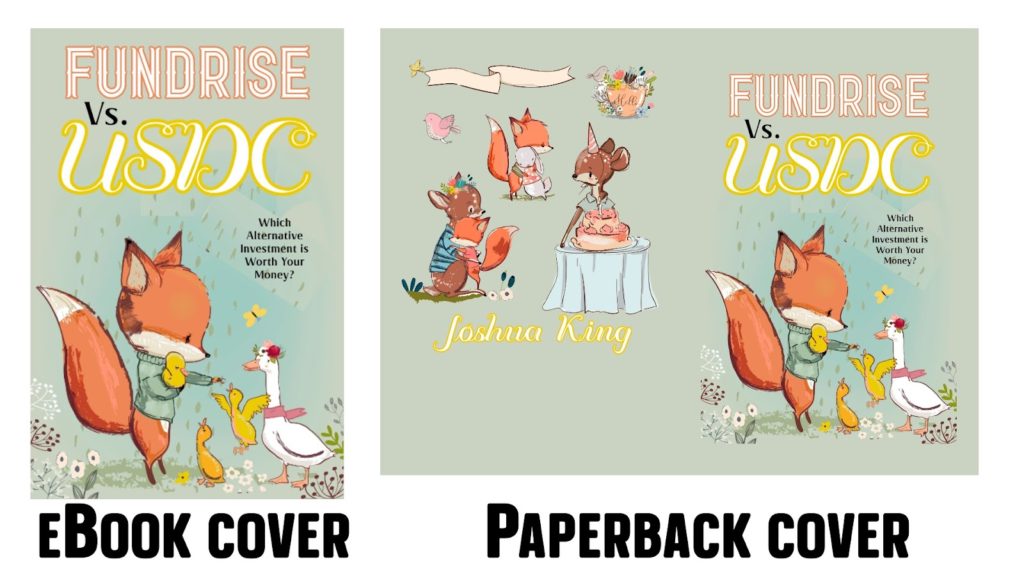
Think of a paperback as two ebook book covers with a spine. You have to create one jpeg with both sides and a spine. Then you need to print it as a production-level pdf. I do all the artwork through Pixlr.com.
Real Estate is a Mindset (Advanced)
When I have the full-length jpeg, I then go to Canva.com to upload this picture. From there, I can download it in full production pdf format. I go back to Amazon and upload the new manuscript Docx and cover pdf print.
Conclusion. Yes, it’s a lot of work. Few people on this Earth can accomplish this amount of different and varied tasks. You should be proud of yourself.
The main idea is to keep your workflow light if you want to be a traveler. There are all kinds of other laptop-only businesses, but writing and producing books is the most passive.
The Magic of Cryptocurrencies
Without releasing new books, my books will continue to sell. Of course, there will be a significant drop in sales if I stop producing new content; however, I can take a break at my leisure.
Don’t let this workflow scare you. “You are the Brand,” says it best. Only add one significant business model to your workflow every year. In my first year, I focused solely on ebooks on Amazon. In year two (this year), I am concentrating on paperbacks and different retailers.
I don’t know what year three will bring, but I am excited beyond belief. I have so much fun grinding away at my books. I’m sure you will enjoy it too!


- PDF of the Month: Don’t Gamble with Retirement 7 (Free 424-Page PDF)
- Free PDF Downloads: Download FREE PDF LIST here
- Financial Mindset: Become CEO of Yourself 2 (Free 196-Page PDF)
- Retirement Planning: Your Retirement Planning Guide 2 (Free 255-Page PDF)
- Investing: How We Plan to Retire on Dividends 2 (165-Page Free PDF)
- Cryptocurrencies: Counting on Crypto 2 (Free 159-Page PDF)
- Real Estate: Financial Independence through Real Estate 2 (Free 123-Page PDF)
- Business: Retire Rich, Retire Comfortable with a Business 2 (Free 185-Page PDF)
- Latest DGWR: Don’t Gamble with Retirement 6 (Free 409-Page PDF)
- Everything!: The Biggest Book on Passive Income Ever 2! (book)(Web Edition)(Art Edition)
- I bought a Kindle Oasis: Check it out on Amazon
- Read My Books for Free: Free Kindle Books Schedule
- Crypto Exchange: My Favorite Crypto Exchange VOYAGER (Join Voyager)
- Kindle Unlimited: Why I Finally Subscribed Kindle Unlimited (learn more)
- Book Reviews: 505 Takeaways from 101 Books (pdf)
- Writing: The Publishing Chronicles (Part 1, Part 2, Part 3, Part 4)
- Best REIT- Fundrise: REITs vs. Homeownership (Join Fundrise)
- Follow us: On our Facebook Page and Join our Facebook Group
- Monthly Dividend Tracker (XLSX): Check it out on Etsy
- For more detailed analysis, join my Youtube: MFI YouTube Channel

Monthly Dividend Tracker Template: Buy on Etsy
Disclosure: I am not a financial advisor or money manager, and any knowledge is given as guidance and not direct actionable investment advice. I am an Amazon Affiliate. Please research any investment vehicles that are being considered. I wrote this article myself, and it expresses my own opinions. I am not receiving compensation for it. I have no business relationship with any company whose stock is mentioned in this article. All Right Reserved Military Family Investing


Leave a Reply to nextogel Cancel reply